
About Microsoft Translator in Pairaphrase
Microsoft Translator provides machine translation inside the Pairaphrase platform. When Microsoft Translator is available in your plan, you can select it as the translation engine for supported translation projects.
This allows users to translate content in Pairaphrase using Microsoft’s machine translation technology without leaving the platform.
When to use Microsoft Translator
Microsoft Translator is a practical option for many general translation projects, including:
- Business documents
- Internal communications
- School and district communications
- Healthcare-related content
- Public-facing notices
- Operational materials
- Recurring or high-volume translation needs
It is often a useful choice when you need broad language support and a classic machine translation approach.
Key capabilities
Microsoft Translator in Pairaphrase supports:
- Machine translation for supported languages
- Neural machine translation technology
- Translation directly within the Pairaphrase workflow
- Use with supported file types and translation projects
- Efficient processing for common document translation needs
Availability may depend on your Pairaphrase plan and the languages selected for your project.
How to select Microsoft Translator in Pairaphrase
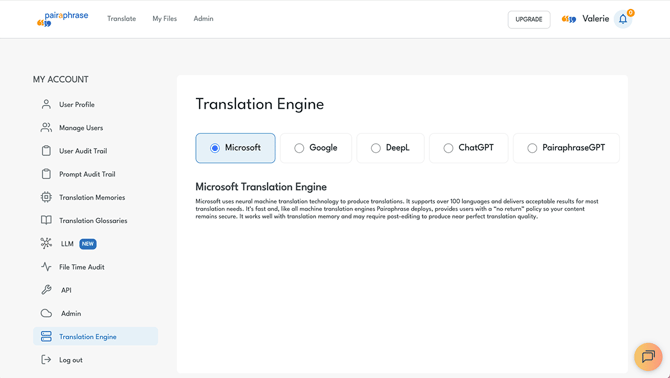
To select Microsoft Translator as your translation engine:
- In the Pairaphrase app, click your name in the top right corner.
- Under My Account, click Translation Engine.
- Select Microsoft.
After the translation is processed, review the translated content before finalizing or downloading your file.
Need help?
Need help using Microsoft Translator in Pairaphrase? Contact us via online chat for the fastest customer support.