
The AI Sandbox in Pairaphrase isn’t just for translation — you can also use it to generate original content from your prompts. This feature helps you brainstorm, draft, and refine content in multiple languages directly within the secure Pairaphrase environment.
Whether you need marketing copy, lesson materials, internal communications, or creative writing, the Sandbox can assist you.
Watch the video below or follow the step-by-step guidelines to learn how to use the AI Sandbox in Pairaphrase:
Step 1: Access the Sandbox
- Log into your Pairaphrase account.
- Navigate to Translate in the main menu.
- Click AI Sandbox.
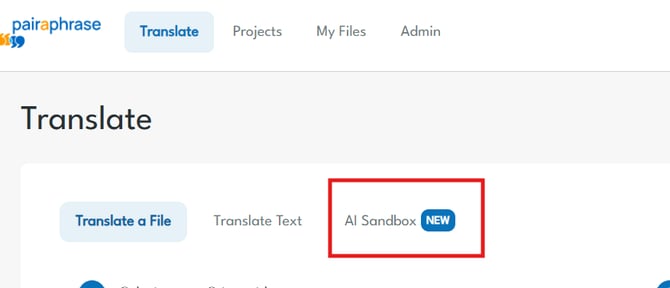
This will open the workspace where you can enter your own prompts.
This will open the workspace where you can enter your own prompts.
Step 2: Select Your Model
Available Models
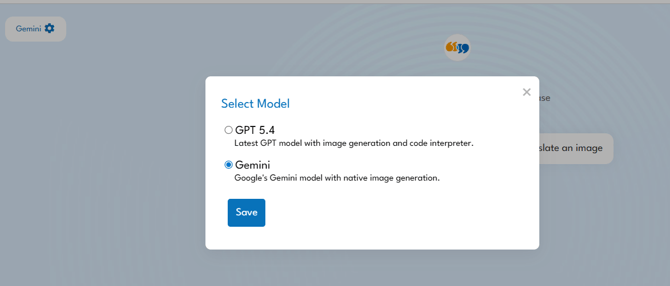
The Sandbox gives you access to two AI models. You can switch between them at any time by clicking the Settings (⚙️) icon in the top-left corner of the Sandbox.
GPT 4.5
- Best for: Translating IEPs and text-based content
- The latest GPT model, optimized for document translation workflows — ideal when working with Individualized Education Programs (IEPs) or any structured text.
Gemini
- Best for: Translating images (PNG, JPEG)
- Google's Gemini model with native image generation capabilities — use this when you need to translate content embedded within an image file.
How to select a model:
- Click the gear icon ⚙️ next to “Pairaphrase.”
- Choose your model from the list.
- Click Save.
Your chosen model will now be used in the Sandbox until you change it.
Step 3: Select or write your prompt
Type a clear instruction for what you’d like the selected model to create. Examples:
- “Write a LinkedIn post about the benefits of secure translation software.”
- “Draft an email to parents about the first day of school.”
- “Create a video script in Spanish about our new AI-powered features.”
The more specific your prompt, the more accurate the output.
Pre-made prompts
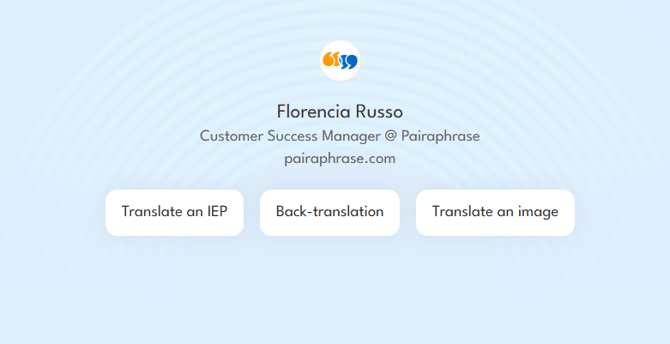
To help you get started quickly, the Sandbox includes a set of pre-made prompts you can use right away:
- Translate an IEP — Translate a full IEP document using GPT 4.5 and download the final docx version
- Back-translation — Run a back-translation to verify accuracy.
- Translate an image — Upload a PNG or JPEG and translate its content using Gemini.
Simply click any of the prompt buttons on the Sandbox home screen to begin.
Step 3: Download your content
Once you’re happy with the output:
- Download your document or image directly from the Sandbox.
Security & Privacy
All Sandbox activity takes place inside Pairaphrase’s secure platform. Unlike public AI tools, your prompts and content are encrypted and never exposed to external systems.
Quick tips
|
Task |
Recommended Model |
|
Translating IEPs |
GPT 4.5 |
|
Translating text documents |
GPT 4.5 |
|
Translating images (PNG/JPEG) |
Gemini |
|
Back-translation |
GPT 4.5 |
Best uses for original content in the Sandbox
- Drafting internal communications in one or more languages
- Writing lesson plans, study materials, or newsletters
- Creating marketing copy (ads, posts, emails, scripts)
Security & Privacy
All Sandbox activity takes place inside Pairaphrase’s secure platform. Unlike public AI tools, your prompts and content are encrypted and never exposed to external systems.
Need Help?
If you’d like tips on writing better prompts or using the Sandbox for specific projects, contact us here.