
Pairaphrase includes AI-powered actions directly inside the Editor, allowing you to work at the segment level without re-running an entire translation. These tools give you more control and flexibility while reviewing translated content.
How to Access the AI Tools
All AI tools are available from the three-dot menu next to each translated segment in the Translation Editor.
Steps:
-
Open a translated file in the Translation Editor
-
Locate the segment you want to adjust
-
Click the three-dot icon next to that segment
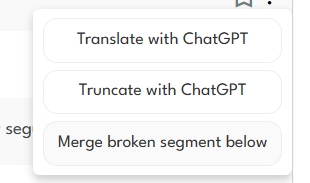
How to Translate a Segment with ChatGPT
Generate an alternative AI translation instantly.
This option lets you regenerate a single segment using ChatGPT—even if the original translation was created with another engine such as DeepL or Google.
Use this when you need to:
-
Review tone and fluency
-
Explore alternative phrasing
-
Improve clarity or natural language flow
How to Truncate a Translation with ChatGPT
Shorten translations while preserving meaning.
This tool intelligently reduces the length of a translated segment, making it ideal for layouts with strict character limits.
Best for:
-
UI strings
-
Tables and forms
-
Subtitles or labels
-
Design-heavy documents
Why These AI Tools Matter
Using these features helps you:
-
Edit faster without re-translating entire files
-
Improve translation quality at the segment level
-
Adapt content to layout and character constraints
-
Maintain full editorial control
Need Help or Want to Learn More?
If you’d like help using these AI tools or want guidance on optimizing your translation workflow, contact the Pairaphrase team. We’re happy to help you get the most out of your translations.