
Google SSO supports controlled access to these translation workflows while reducing the need for users to manage another set of login credentials.
Benefits of Google SSO
Google SSO can help organizations:
- Give users access through their existing Google Workspace accounts
- Simplify onboarding and sign-in
- Reduce the number of passwords users need to manage
- Keep access aligned with existing organizational account policies
- Support controlled access to sensitive or compliance-sensitive translation workflows
Google SSO changes how users authenticate. It does not change their Pairaphrase role, Groups or access permissions.
Before you begin
Make sure that:
- You have an active Pairaphrase account.
- You have access to your organization’s Google Workspace account.
- You are signed in to the correct Google account in your browser.
- Your Google Workspace email account is the one you want to connect to Pairaphrase.
Google SSO is intended for managed Google Workspace accounts. Personal Gmail accounts may not be supported.
Set up Google SSO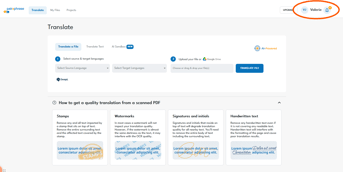
- Sign in to Pairaphrase.
- Select your name in the upper-right corner.
- Open your User Profile.
- Scroll to the bottom of the page.
- Select Set up SSO for Pairaphrase.
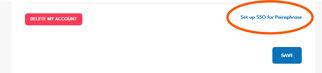
- Follow the instructions shown on the screen.
- When prompted, choose your organization’s Google Workspace email account.
- Complete the Google authentication process.
After setup is complete, the selected Google Workspace account is connected to your Pairaphrase user profile.
Sign in using Google SSO
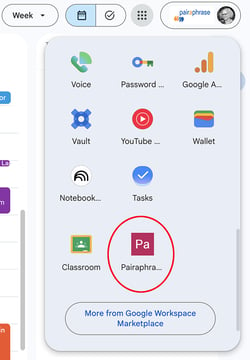
Once Google SSO has been configured, use the Google sign-in option (the 9 dots in the top right of your screen) when accessing Pairaphrase.
Choose the same Google Workspace account that you connected during setup. Selecting a different personal or work account may prevent you from signing in.
Review recent SSO sessions
Pairaphrase displays your recent SSO sessions at the bottom of your User Profile.
To review them:
- Select your name in the upper-right corner.
- Open your User Profile.
- Scroll to the SSO section at the bottom of the page.
- Review the available session information.
This provides visibility into recent access to your Pairaphrase account through Google SSO.
Troubleshooting
I do not see “Set up SSO for Pairaphrase”
Confirm that you are viewing your User Profile. If the option is unavailable, contact your Pairaphrase administrator or Pairaphrase Support.
Google shows more than one account
Choose the managed Google Workspace account you want to connect to Pairaphrase. Do not select a personal Gmail account.
I selected the wrong Google account
Restart the setup process and choose the correct account. You may need to sign out of the incorrect Google account or open Pairaphrase in a private browser window.
I receive an “app_not_configured_for_user” error
This error may appear when the selected account is not authorized to use the Pairaphrase SSO service. Confirm that you selected a managed Google Workspace account.
Your organization’s Google Workspace administrator may also need to enable Pairaphrase for your account or organizational unit.
I cannot sign in after completing setup
Confirm that you are using the same Google Workspace account connected to your Pairaphrase profile. If the issue continues, contact your Pairaphrase administrator or Pairaphrase Support.
Frequently asked questions
What is the advantage of using Google SSO?
Google SSO allows users to access Pairaphrase through their existing Google Workspace account. This can simplify onboarding, reduce separate password management and help organizations keep access aligned with their existing account policies.
Can I use a personal Gmail account?
Google SSO is intended for managed Google Workspace accounts. A personal Gmail account may return an error because it cannot be authorized through an organization’s Workspace configuration.
Does Google SSO change my Pairaphrase permissions?
No. Google SSO changes how your identity is authenticated. Your Pairaphrase role, Groups and access to translation resources remain controlled within Pairaphrase.
Where can I see my recent SSO activity?
Recent SSO sessions are displayed in the SSO section at the bottom of your Pairaphrase User Profile.
Who should I contact if setup does not work?
Contact your organization’s Google Workspace administrator if the selected account is not authorized. For Pairaphrase account or setup issues, contact your Pairaphrase administrator or Pairaphrase Support.