
DeepL is machine translation software developed by DeepL GmbH. It uses neural network technology to provide accurate, context-aware translations across supported languages.
When DeepL is available in your Pairaphrase plan, you can select it as your translation engine for supported projects. This allows you to use DeepL’s translation technology directly inside the Pairaphrase platform.
When to use DeepLDeepL is a strong option for translation projects that require natural phrasing and careful handling of context. It is commonly used for:
- Business communications
- Marketing materials
- Customer-facing content
- Technical documents
- eLearning content
- Professional correspondence
- Content that may require transcreation or more polished wording
DeepL supports 31 languages and is often preferred when translation quality is a higher priority than maximum language coverage.
Key capabilitiesDeepL in Pairaphrase supports:
- Neural machine translation
- Auto-detect for source language identification
- Glossary support
- Context-aware translation output
- Natural-sounding translations for supported languages
- Use with supported Pairaphrase file types and translation projects
Availability may depend on your Pairaphrase plan, selected languages, and project type.
Working with Translation MemoryDeepL works with Pairaphrase Translation Memory. Translation Memory helps reuse previously translated text segments, which can improve consistency and reduce repeated editing across similar projects.
This is useful for organizations that translate recurring content, standardized communications, or documents with repeated language.
Translation quality and reviewDeepL is highly regarded for translation quality, but translated content should still be reviewed before finalizing or downloading your file.
Review is especially important for specialized terminology, legal language, healthcare communication, public-facing materials, and content where tone must be carefully controlled.
How to select DeepL in PairaphraseTo select DeepL as your translation engine:
- In the Pairaphrase app, click your name in the top right corner.
- Under My Account, click Translation Engine.
- Select DeepL.
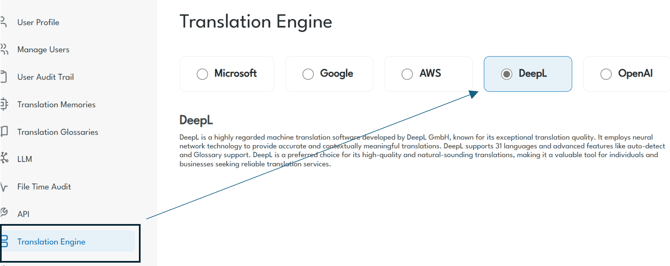
Once selected, DeepL will be used as your translation engine for supported projects, based on your plan and available language options.
How to translate with DeepL in PairaphraseAfter selecting DeepL as your translation engine:
- Choose your source and target languages.
- Upload your file.
- Start the translation.
- Review the translated content in the Pairaphrase Translation Editor.
- Finalize and download your translated file.
Need help using DeepL in Pairaphrase? Contact us via online chat for the fastest customer support.